Thursday, May 19, 2016

Linus Torvalds Releases Linux 4.6 With New Features — Download Now


After seven release candidates, the Linux 4.6 kernel was officially released by Linus Torvalds on May 15. As the third major Linux kernel release in 2016, the Linux 4.6 kernel is here 8 weeks after the Linux 4.5 kernel. It includes many changes like the support for OrangeFS file system, USB 3.1 SuperSpeed Plus protocol, and better driver support.


Linux 4.6 kernel is codenamed the “Charred Weasel”. After receiving a total seven Release Candidate builds and spending two months in development, the final production version of kernel is here with new features, security improvements, and updated drives.
“It’s just as well I didn’t cut the rc cycle short, since the last week ended up getting a few more fixes than expected,” wrote Linus Torvalds about the latest release.
As 4.6 kernel is released on time, Torvalds has announced that he will start doing merge window pull requests for 4.7 kernel from tomorrow.

The new features in Linux 4.6 kernel

In the form of big changes coming to kernel, Linux 4.6 brings the full support for the USB 3.1 SuperSpeed Plus protocol, giving you the transfer speeds of up to 10Gbps, compared to 5Gbps speed of USB 3 and 480mbps speed of USB 2.0.
The other big features coming to Linux is the support for OrangeFS distributed file system along with the support for Intel Memory protection keys and improvements of the Out Of Memory task killer.
To make the open-source AMD graphics driver stack more stable, various AMDGPU and Radeon improvements have been made.
Linux 4.6 kernel release also bring the 3D/acceleration support for NVIDIA GeForce GTX 900 “Maxwell”. Please note that it’s just an initial support and it doesn’t bring any re-clocking support.
With the new Kernel Connection Multiplexor (KCM) technology, networking has also got a boost with an ability to use TCP to send and receive application protocol messages.
With the new driver changes, Dell and Alienware laptops, including Dell XPS 13 Skylake, are now better supported.
Othe changes in Linux 4.6 kernel include 802.1AE MAC-level encryption support, BATMAN V protocol support, pNFS SCSI layout support, and online inode checker for the OCFS2file system

Linux 4.6 kernel is available for download on  Kernel.org

Thursday, May 12, 2016

Coder Creates “HTML5 Mario” Written in OCaml – Play It Right Now In Your Browser

Matthew Hsu, a young coder from Cornell University, has created HTML5 Mario, written exclusively in OCaml. He has also made the source code of this geeky rendition of Super Mario Bros available on GitHub.
Matthew calls his creation MariOcaml as it’s an OCaml implementation of the game. The game consists of usual features of Super Mario Bros, including basic enemies, blocks etc. with practice support.
The key features of the code include a 2D Mario platformer for emulating the platform mechanics of the games and a web-based playable implementation with graphics (OCaml transpiled to JavaScript). For randomly generating the levels, a procedural level generator was used.
I played the game and found it comparatively difficult than the usual versions. The new Mario seemed to slide forward as I tried to stop him. I guess Mario inMariOCaml has more inertia.
Matthew has kept the design of the game pretty neat and modular to ensure that he can add more features later. Using js_of_ocaml, the game has been made interactive and graphical, that allows cross-compilation of OCaml to JavaScript.
You can find the related GitHub code here and play the “HTML5 Mario” written in OCaml here. The game runs in any modern desktop web browser.

WhatsApp Releases Desktop Apps For Windows and Mac


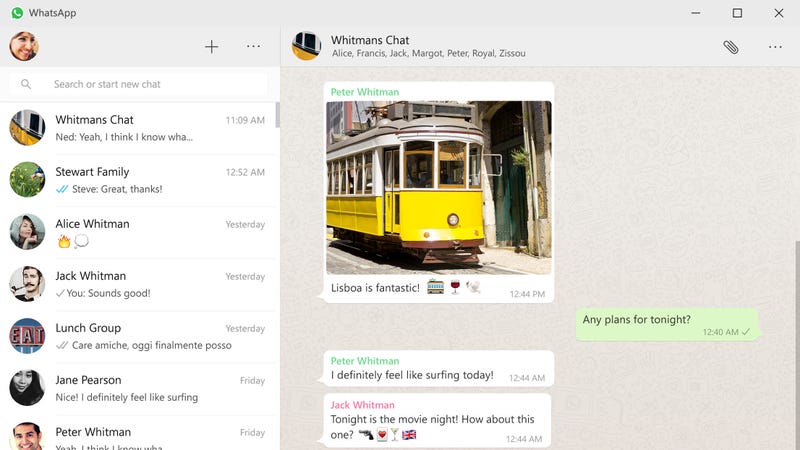
Windows/OS X: WhatsApp is working hard to become your go-to messenger. Now that it’s free for everyone, you can use WhatsApp on your computer with the new desktop apps.
When you first login to WhatsApp on the desktop, you’ll be prompted to scan a code from the mobile WhatsApp app on your phone. You can insert your own Yo Dawg joke here. To scan the code from your phone, press the menu button in WhatsApp and tap WhatsApp Web. Here you can scan the QR code on your computer. Later, you can also view a list of all desktop or web clients that are logged into your account from this menu.
The desktop app works much like WhatsApp Web. You can send messages, attachments, record voice messages, send pictures, and manage your message history. It might be missing a couple features from the phone version (I can’t find a way to change a conversation wallpaper from the desktop version, for example) but it should be mostly the same experience you’re used to.
Read Official Blog

Friday, April 1, 2016

Hub vs Switch: Comparison And Difference Between Networking Devices

Hub vs Switch – which one is better? Which one should be used for faster communication? Which one is more secure? Well, we answer all the aspects of using a hub and a switch against each other in this article. 
Hub was very popular before the arrival of a Switch. So, what was something special inside a Switch which made Switch so popular? We will take a look at all the differences and functional aspects between a Switch and hub.
Let’s take a look:

Hub vs switch — Comparison and differences
Hub’s properties:
§ Works at the physical layer of the OSI layer
§ Uses ‘Store and forwarding’ when it receives a data packet
§ A virtual LAN cannot be created using a hub
§ Usually comes with 4 to 12 ports
§ Only transmits electrical signals or the bits (relate it with physical layer)
§ Does not use any software
§ Does not have its own memory for memorizing the devices connected over to the network
§ Cannot learn the MAC addresses and neither can forward them
§ Supports Half-duplex transmission mode
§ A hub has only one broadcast domain
§ Cannot support Spanning tree protocol
§ Packet collisions occur commonly inside a hub

Switch’s properties:
§ Works at the Data link layer or layer two of the OSI model
§ Uses ‘filter and forwarding’ when it receives a data packet
§ A virtual LAN can be created using a Switch and it can also work as a multi-port bridge
§ Usually comes with 24 to 48 ports
§ Transmits Frames (layer 2 packets) and Layer 3 packets of the OSI model
§ Uses its software for admin access and other configurations
§ Has its own memory for memorizing the devices connected over to the network
§ Can learn the MAC addresses and stores those addressed in a CAM (Content Addressable Memories)
§ Supports Half as well as full duplex transmission mode
§ A hub has only one broadcast domain
§ Can support Spanning tree protocol
§ No packet collisions occur commonly inside a hub

Working differences — Hub vs  switch
Before you proceed to further reading, have a look at the basic concepts of the different networking devices and hardware types — hub, switch, router, modem, bridge, repeater.
Let’s say a few computers are connected to a hub in one of the scenarios and in the other scenario, they are connected to a switch.
In the Hub’s case, when all the computers send data packets, those are copied as a signal at the different ports of the hub. That means, the hub simply replicates the signal and the intended recipient gets the packets. Since there is no concept of filtering the packets and forwarding those, there will be a lot of collisions as well.
When the same data packet will arrive at one of the ports of a Switch, the following generic steps will take place:
§ A data packet arrives at one of the ports.
§ The Switch checks of the address inside the data packet (also called as a frame of layer 2 on OSI model)
§ The switch has a CAM table and it will match the address of the frame with one of the addresses of the CAM table.
§ If the address matches, the switch known the particular port at which that address resides. So the Switch will forward that packet to that particular port and this is also called as ‘Filter and forwarding’ in computer networks terms
§ These things are all possible because of a configuration file and memory inside a Switch which is absent in a hub.
§ The network admin can configure the switch according to his preference.
§ Because of the filter and forwarding, there is no collision inside a switch.


Wednesday, March 30, 2016

GTUResults Android App By GTU

GtuResults is an app which allows Gujarat Technological University's students to see their current and past results in the most easiest & fastest way.
GTU Results is an application which checks the GTU site for new results and gives you any new result gets updated.It displays Result on demand.
GTU ( Gujarat Technological University ) decided to make the best use of smartphone by creating a bridge between GTU students and University.
No authentication ( Login/Registeration) required. This is an app to check GTU Results faster on your smartphones, Just need to enter Enrollment no. and the students can see their results.
Result app provides functionality to let students choose their session , course , semester & exam easily with user friendly UI.
It will helpful to GTU Students and Faculties.GTU Result provides a better UX (user experience) to students to let them know their results, also it features to see each subject result in detail (Internal/External).
App make things easier to find result of GTU students of all the courses i.e. BE, BArch ,BH, BPH, DA, DIPL, DPH, IC, MAM, MBA, MCA, ME, MPH, MPM, MTM, PDDC.
  
Download GTUResults.apk
 

Friday, December 4, 2015

Webinar On Android

Hello Everyone
Please Register For This Webinar

Register

Topics
>>Basics Of Android
>>History